Epiq Discover Version 3.9.6 Release Notes (December 2024)
This release contains updates and improvements to Epiq Discover. The following notes highlight new enhancements to Epiq Discover and provide a list of bugs addressed in this release.
Release Highlights
Release 3.9.6 contains the following features, as well as additional enhancements listed in this document. The following sections contain details about these features and enhancements.
-
-
. Loading now supports additional date formats, including single digit day, single digit month, and two-digit year formats.
-
. You can now map single choice and multiple choice fields when loading documents. You can map the existing single choice and multiple choice fields created in Epiq Discover, as well as create single choice and multiple choice fields in Desktop Client.
-
Enhancements in Release 3.9.6
This release contains the following enhancements and updates.
General
Report name standardization
Updated the file names of project and client reports for better identification. (626460)
Project reports
The names of the following reports now include project name, job name, report name, and time stamp separated with hyphen.
|
Report |
Job Name |
|---|---|
|
Collection Report |
Collection job name |
|
Processing Report |
Collection job name |
|
Processing Exception Report |
Collection job name |
|
Production Summary Report |
Production job name |
|
Search Hit Report |
Filter job name |
When multiple collections, productions, or filter jobs are selected, the job name displays as “Multiple”. The following figure shows examples of these report names.
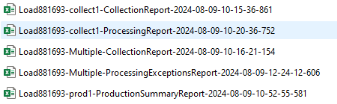
The names of the Summary Exception Report and User Audit History Report now include project name, report name, and time stamp, separated with hyphens. The following figure shows examples of these report names.

The format for the report timestamp is yyyy-mm-dd-hh-mm-ss-ms, displaying 24-hour format and milliseconds (ms).
Client reports
The names of the Client Production Summary Report and User Login History Report now include client name, report name, and time stamp separated with hyphen. The following figure shows an example of the User Login History Report name.

The format for the report timestamp is yyyy-mm-dd-hh-mm-ss-ms, displaying 24-hour format and milliseconds (ms).
Client Dashboard update
In DASHBOARD, updated the label to for clarification. (904198)
Added hovertext for fields that have long names
Now, when selecting fields from the fields list, performing document actions, and setting up export templates, when field names exceed 30 characters, you can hover over the field to display the full field name. (810851)
Inspect/Review
Transfer to Relativity updates
Added a confirmation dialog box that appears after you submit a Transfer to Relativity job. The confirmation dialog box shows the following message: Confirm that you want to transfer the selected documents to Relativity workspace: <workspace name>. (710373)
Document Prefix update
Now, if is enabled in , when you transfer documents to Relativity, the system displays a warning message, indicating that with this option enabled, you cannot transfer documents to Relativity. This message appears after you establish a successful connection to Relativity and initiate the transfer process. However, you can continue with the transfer process by closing this dialog box. (835240)
Securable folder updates
Folder job information pop-up update
In the page and the page in Inspect or Review, the Litigation Support and Review Manager role can no longer view information in the Folder job information dialog box. (906681)
Folder update
Now, if there is no user group available in a project, when creating or modifying a folder in Inspect or Review, the button in the or dialog box is inactive, and the hovertext of this button shows . (906724)
Email Threading: Inclusive email files update
In this release, updated the logic of Inclusive Minus and Inclusive Copy email files that the system identifies during the job. The following table clarifies the previous and new behavior. (894779)
| Field value | Updated behavior in this release | Previous behavior |
|---|---|---|
| An inclusive minus email file contains a unique attachment not found in any other inclusive email files within the email thread. | At least one attachment associated with the parents of the inclusive message is missing. | |
| An inclusive copy email file has the exact same content as another inclusive email file but with different participants. | The email is a copy of another message marked as Inclusive or Inclusive minus. |
Assignment update
Now, when you assign one or more batches in an assignment to the Senior Reviewer role, they can view only the documents in the batches assigned to them. Previously, they could view the documents in the batches that were not assigned to them. (908862)
-
In Inspect or Review, when the Senior Reviewer role searches for documents using the assignment name, the system now returns only the documents from the batches assigned to them.
-
In >, by clicking in the window of an assignment, the Senior Reviewer role can now view only documents in the batches assigned to them.
-
When the Senior Reviewer role assigns a batch themselves, they can view the documents in that batch.
Also, when a Senior Reviewer checks in all batches assigned to them as Pending, the assignment is removed from the pane. (909764)
Administration
Processing settings update
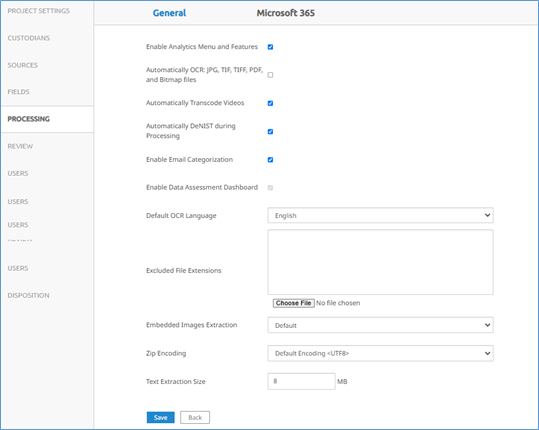
In  >, added a new tab and moved all the processing settings from tab to this new tab. (850696)
Desktop Client
Enhanced support of date and time formats
The system now supports the date and time formats mentioned in the below table when loading files. (777174)
|
12-hour format |
24-hour format |
12-hour with seconds |
24-hour with seconds |
|---|---|---|---|
|
mm/dd/yy hh:mm aa |
mm/dd/yy HH:mm |
mm/dd/yy hh:mm:ss aa |
mm/dd/yy HH:mm:ss |
|
mm-dd-yy hh:mm aa |
mm-dd-yy HH:mm |
mm-dd-yy hh:mm:ss aa |
mm-dd-yy HH:mm:ss |
|
mm.dd.yy hh:mm aa |
mm.dd.yy HH:mm |
mm.dd.yy hh:mm:ss aa |
mm.dd.yy HH:mm:ss |
|
yy/mm/dd hh:mm aa |
yy/mm/dd HH:mm |
yy/mm/dd hh:mm:ss aa |
yy/mm/dd HH:mm:ss |
|
yy-mm-dd hh:mm aa |
yy-mm-dd HH:mm |
yy-mm-dd hh:mm:ss aa |
yy-mm-dd HH:mm:ss |
|
yy.mm.dd hh:mm aa |
yy.mm.dd HH:mm |
yy.mm.dd hh:mm:ss aa |
yy.mm.dd HH:mm:ss |
|
m/d/yy hh:mm aa |
m/d/yy HH:mm |
m/d/yy hh:mm:ss aa |
m/d/yy HH:mm:ss |
|
m-d-yy hh:mm aa |
m-d-yy HH:mm |
m-d-yy hh:mm:ss aa |
m-d-yy HH:mm:ss |
|
dd/mm/yyyy hh:mm aa |
dd/mm/yyyy HH:mm |
dd/mm/yyyy hh:mm:ss aa |
dd/mm/yyyy HH:mm:ss |
|
dd/mm/yy hh:mm aa |
dd/mm/yy HH:mm |
dd/mm/yy hh:mm:ss aa |
dd/mm/yy HH:mm:ss |
Loading update
Added the ability to map single choice and multiple-choice fields
You can now map single choice and multiple choice fields when loading documents. You can map existing single choice and multiple choice fields created in Epiq Discover or you can create single choice and multiple choice fields in Desktop Client. (743421)
-
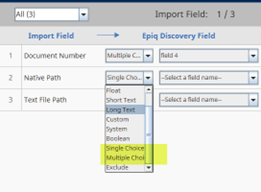
To map the existing single choice and multiple choice fields, when mapping each by data type, select or as the type of data and then select the associated field name.
-
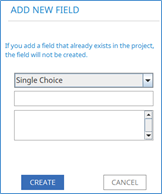
To create single choice or multiple choice fields, when mapping each by data type, perform the following actions.
-
Select from the field type drop-down list.
-
In the dialog box, do the following steps.
-
Select or as the data type.
-
In the name field, add a name for the field.
-
In the value field, add field values. Enter one value per line.
-
Click .
-
-
The single choice or multiple choice fields that you create in Desktop Client are editable by default in coding forms. You can make these fields read-only in Epiq Discover when editing them in Project Settings.
File paths update
Now, the system supports parentheses in file paths when loading files. (837952)
Bugs fixed in Release 3.9.6
The following bugs were resolved in this version.
|
Number |
Title |
|---|---|
|
821979 |
Loading | Text files are failing to load with Old/New workflow |
|
833031 |
Loading | Successfully loaded documents not showing up in Platform |
|
835214 |
Desktop Client > Loading | Updating document without including file path alters Record Type in MySQL |
|
849759 |
Loading & Overlay | Short Text custom Field ingestion issue |
|
856700 |
Loading | Loading Job completed with "Read timed out - java.net.SocketTimeoutException: Read timed out" |
|
860596 |
Project created with error "Uncaught exception occurred in /rest/project/features, returning the basic exception response." |
|
881693 |
Transfer to Rel | Job fails to transfer due to FileStream error, but it shows as disk space issue |
|
882181 |
Processing | Expecting exactly 1 file location for document 0 document file type name of Original Native and file type id 1 in project xxx |
|
883953 |
Mobile Collection | When Mobile Collection is re-tried, the job popup shows incorrect document count / zero |
|
896482 |
Email Threading | There is inconsistency in emails identified as 'Thread Inclusive' for the emails threaded together |
|
900136 |
Inspect/Review | The response content must be rendered before it can be iterated over |
|
900169 |
Inspect/Review | int() argument must be a string, a bytes-like object, or a real number |
|
901819 |
Filter Jobs | Keyword filter job doc count not Matching with Report Hits |
|
905278 |
Desktop Loading | Document IDs are not in worker logs |
|
906693 |
Angular | Coding Form | Boolean Field Misinterpreted in the Search Builder |
|
907095 |
Loading | Records without Family Number silently fail to load |
|
908120 |
DataHub | Datahub job with error " java.util.concurrent.TimeoutException " |
|
908457 |
Document List | Review | Noticing for specific user roles, after the document list is loaded and user navigates to different pages, noticing lingering degradation with "documents-review" |
|
908803 |
Securable Folders | Group/Roles | For specific lower user roles, noticing a performance degradation occurring when attempting to load documents |
|
908832 |
Administration | Review Manager unable to see documents in Review |
|
908868 |
Performance | For some lower roles, error 502 returned when switching pages with 1000 documents and documents have high (100k+) attachments |
|
909569 |
Deduplication | Cannot create more than max prepared stmt count statements (current value: 50000) |